
Firefox image upload
Right-click. Link copied.
A free Firefox add-on. Right-click any image, choose Upload to BasePic, and the short link is on your clipboard. No sign-up, no API key.
Not on Firefox? Use basepic.com in any browser, the Windows app or the ShareX uploader.
How it works
- Add to Firefox
Open the add-on on addons.mozilla.org and click Add to Firefox. Firefox may ask once to let it contact basepic.com.
- Right-click an image
On any page, right-click a picture and choose Upload to BasePic.
- Link copied
The short link is on your clipboard and a notification shows it. Click the notification to open the image page.
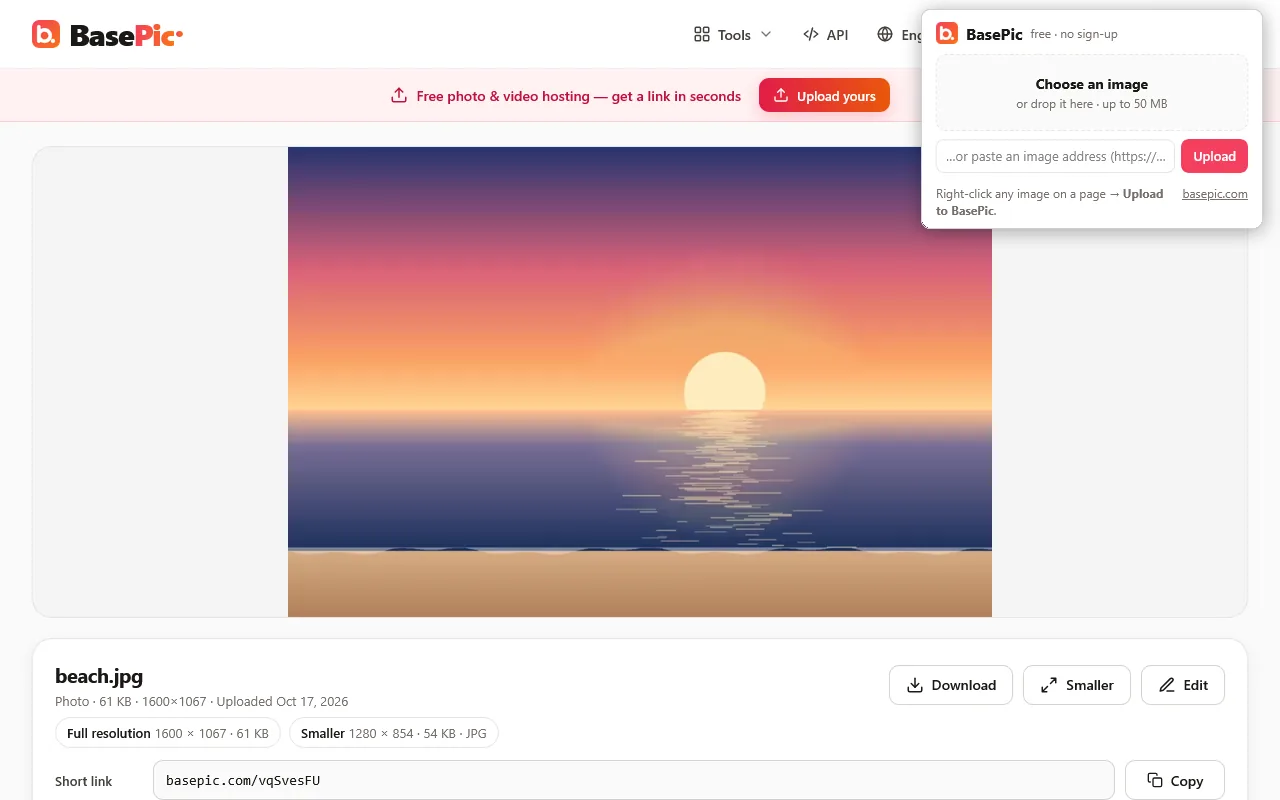
The toolbar button
Click the BasePic button next to the address bar. In the panel, Choose an image from your computer, drop one in, or paste the address of an image and press Upload. You get the link with Copy and Open, and a delete link. The panel also shows the result of your last right-click upload, so the link is never lost.
What the link gives you
The link opens the image page, for example basepic.com/vqSvesFU. There you have the short link, the long link (the image file itself), Copy for forum (BBCode), Copy HTML and embed codes — ready for forums, Discord, Reddit or a blog.
Privacy and permissions
The add-on sends only the image you choose, or its address, to basepic.com. It does not read your browsing, has no analytics and loads no remote code — it is plain, unminified JavaScript. Uploads follow the BasePic Privacy Policy and Terms.
| Permission | Why |
|---|---|
| Access to basepic.com | To upload the image and get the link. |
| Context menus | The Upload to BasePic item on images. |
| Notifications | To show the link when the upload is done. |
| Clipboard write | To copy the link. |
| Active tab and scripting | Only after you click Upload to BasePic: to copy the link on the page you are on and, when needed, to read an image that exists only inside that page. |
Firefox add-on questions
Is the add-on free? Do I need an account?
Yes, it is free. There is no sign-up and no API key: the add-on uploads through the public BasePic API, the same one described on the API page.
Which Firefox versions does it work with?
Firefox 142 or newer on a computer (Windows, macOS, Linux). It is not available for Firefox on Android. In other browsers, open basepic.com and drop or paste (Ctrl+V) an image on the page.
What happens when I right-click an image?
Choose Upload to BasePic. If the image has a web address, BasePic downloads it from there. If it cannot (the image needs a sign-in, or it exists only inside the page as a data: or blob: image), the add-on reads the image from the page and sends the file itself. A notification shows the short link; click it to open the image page.
Is the link always copied?
On normal web pages, yes. Where Firefox does not let add-ons run (for example its own pages and addons.mozilla.org), the notification says Uploaded to BasePic instead; click it to open the link, or open the toolbar panel, which shows the last link with a Copy button.
Can I upload an image from my computer?
Yes. Click the BasePic button in the toolbar, then Choose an image or drop one into the panel. You can also paste the address of an image there. Images up to 50 MB: JPG, PNG, WebP, GIF, HEIC, AVIF, TIFF and other image formats. The add-on uploads images only; for videos and other files up to 2 GB, use basepic.com.
Who can see the images I upload?
Only people who have the link. Uploads are not listed anywhere and are hidden from search engines. Images stay until you delete them. The toolbar panel shows a delete link for your last upload — keep it if you may want to remove the image later.
What data does the add-on collect?
None. It sends only the image you choose, or its address, to basepic.com — nothing else, to no one else. No browsing history, no analytics, no remote code; it declares to Firefox that it collects no data. The last link stays in memory until Firefox closes.
Are there limits?
The same as on basepic.com, per address: 60 uploads or edits per hour, 300 per day and 2 GB per day; 20 uploads from a link per hour and 100 per day. A right-click on an image that has a web address counts as an upload from a link.
How do I remove it?
In Firefox open Add-ons and themes (Ctrl+Shift+A), find BasePic and choose Remove. Images you already uploaded keep working until you delete them.