
phpBB image upload
One button in the editor.
A free phpBB 3.3 extension. Members click Upload image, pick or drop photos, and the BBCode lands in their post. No sign-up, no API key.
Not on phpBB? There is a MyBB plugin and an SMF mod, and the website plugin adds the same button to XenForo, vBulletin, Discourse or any page with a text box — one script tag.
What your members get
- Upload image
A button in the editor toolbar — new topic, reply, edit and private messages — and under the quick reply box.
- Pick or drop
A small BasePic window opens. Choose photos, drop them in, or paste a screenshot. Several at once.
- Insert into post
One click puts the BBCode at the cursor and closes the window. Each image links to its BasePic page.
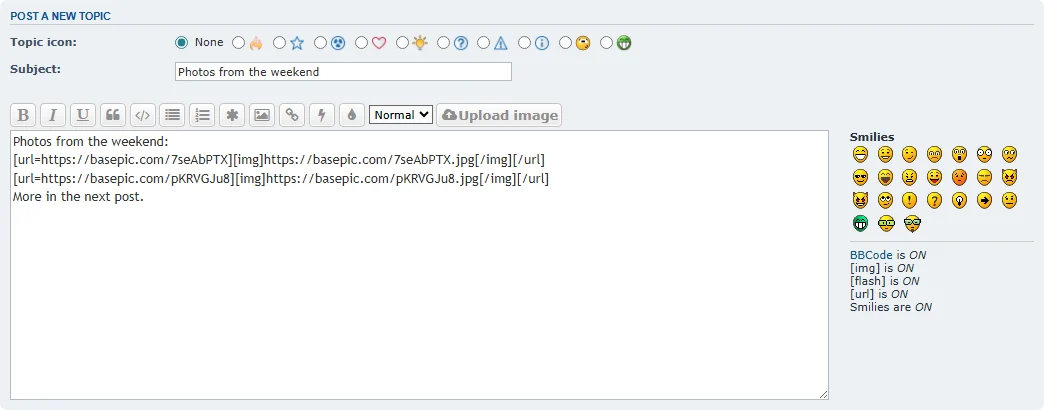
Install in 3 steps
- Download the .zip and unzip it.
- Copy the
basepic/uploadfolder into your board'sext/folder, so that you haveext/basepic/upload/composer.json. - In the ACP open Customise → Manage extensions and click Enable next to BasePic Image Upload.
What gets inserted
Full-size image, linked to its BasePic page (default):
[url=https://basepic.com/vqSvesFU][img]https://basepic.com/vqSvesFU.jpg[/img][/url]With Insert thumbnails on, posts show a thumbnail up to 1280 pixels, linked to the full-size image — lighter topic pages.
Settings
ACP → General → Post settings → BasePic image upload:
| Setting | What it does |
|---|---|
| Insert thumbnails | Yes: a thumbnail up to 1280 px linked to the full-size image. No (default): the full-size image. |
| Upload button in quick reply | Yes (default): the button also appears under the quick reply box. |
Privacy
The extension loads nothing from basepic.com until a member clicks the button. The upload happens in the BasePic window, under the BasePic Privacy Policy and Terms. Programs (.exe, .msi, .apk …) are refused, also inside ZIP files; illegal content is removed.
The .zip is the full source (PHP, JavaScript, GPL-2.0). SHA-256: addcf90c2d06b21e388acfa734219c08d4f7b03d4219b4336682a4fa30d59707
phpBB extension questions
Which phpBB versions does it support?
phpBB 3.3.0 and newer (below 4.0), on PHP 7.1.3 or newer. It was tested on phpBB 3.3.19 with the prosilver style.
Does it work with my style?
The button uses two standard prosilver template events: the editor toolbar and the quick reply box. It works in prosilver and in styles built on it. A style that removes those events will not show the button.
Do my members need a BasePic account?
No. Members upload without signing up, and so do you. There is no API key to set.
Does the extension load scripts from BasePic?
No. Its script (about 3 KB) ships inside the extension and runs only on pages with the editor or quick reply. Nothing is loaded from basepic.com until a member clicks Upload image. The window then sends the code back with postMessage, addressed only to your board.
Who can use the button?
Only members who may post images in that forum: BBCode on and the [img] permission set. Elsewhere the button is not shown.
Where are the images stored and for how long?
On basepic.com, each with its own short link. They stay until the uploader deletes them or until the expiry they choose (1 day to 1 year). Uploads are private — not listed anywhere and hidden from search engines.
Is it free? Are there limits?
Yes, free and open source (GPL-2.0). Limits are per member address: 60 uploads or edits per hour, 300 per day and 2 GB per day; 20 uploads from a link per hour and 100 per day.
How do I remove it?
ACP → Customise → Manage extensions → Disable, then Delete data, then delete the ext/basepic/upload folder. Images already posted keep working.